Funbot Learning
After-school help that stays in your house.
Placement, level-matched practice, and focus tools — with AI on your home network, not the cloud.
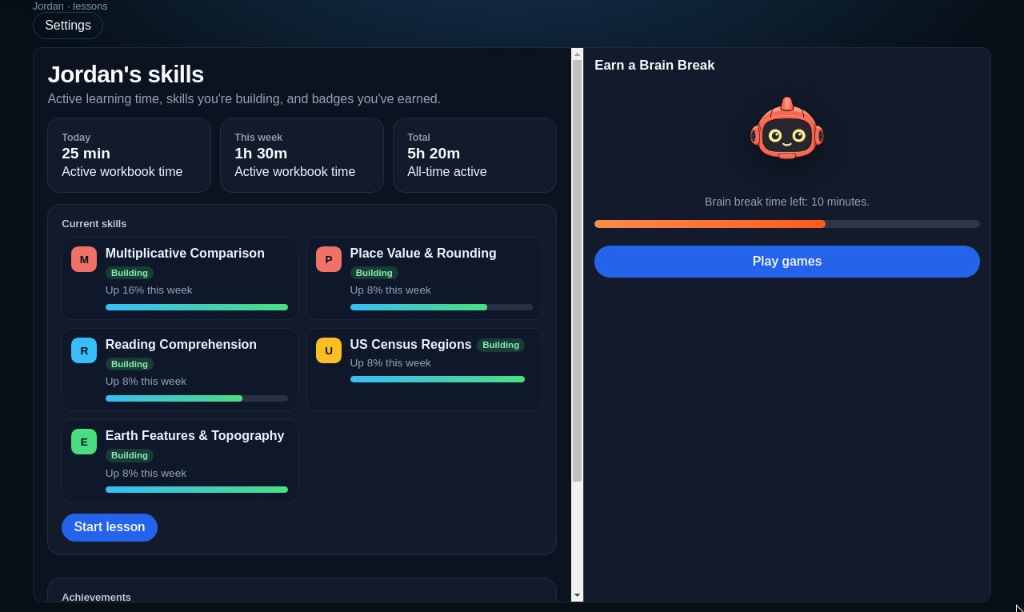
What it does — and does not
Funbot helps parents identify gaps, gives practice at the child’s working level, and guides homework without doing it for them. It does not complete assignments, submit schoolwork, or replace a teacher or parent.
What it looks like tonight
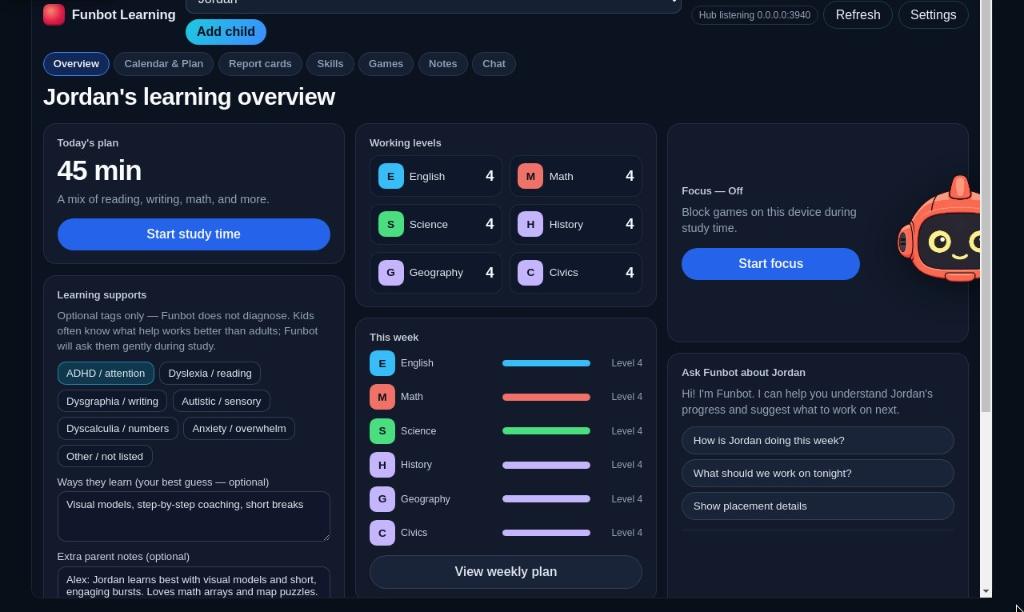
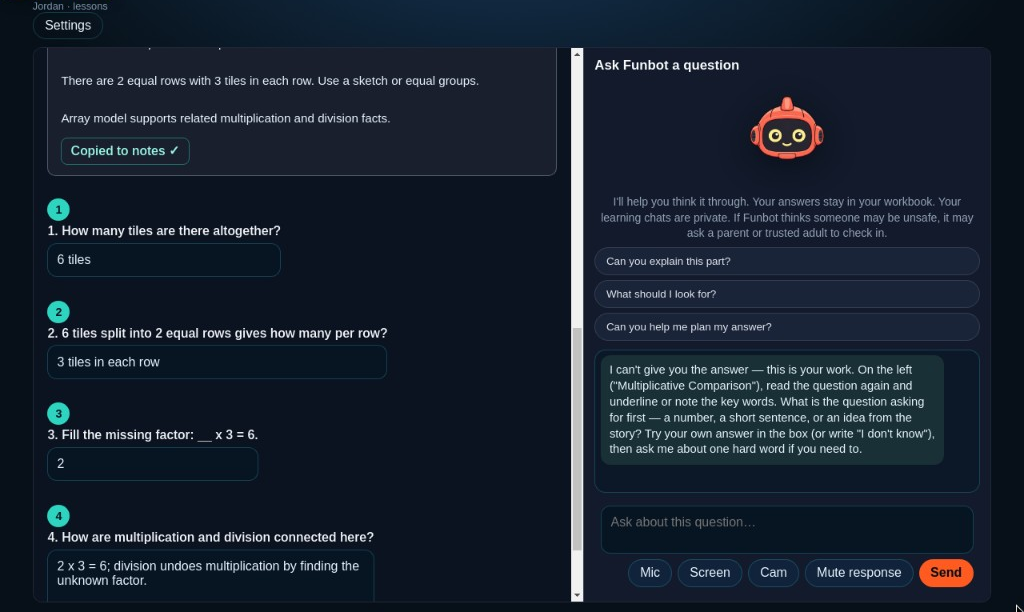
Real screens from the Teacher Trial — parent hub, child practice, and a guide that won’t hand over answers.
Games · Coming feature. Brain-break practice games will unlock after study time in a later update — we’re rebuilding them with more substance before they return in the beta.
How a homework night goes
Built for real evenings — not another login that ships your child’s work to the internet.
- Parent unlocks the hub Set the child, rules, and schedule on the home Windows PC.
- Start at the right level At-grade checks in ELA, math, science, and history — then working levels based on what your child shows today.
- Practice that matches Nightly work at the child’s working level, with a guide that asks questions instead of handing over answers.
- School homework welcome Photo or import a worksheet. Funbot helps them get unstuck — it won’t do the page for them.
What parents get
Structure for the household that meets your child where they are and helps them build forward.
- Parent hub Ask about progress, where they’re stuck, weekly plans, and notes — one child at a time, on your PC.
- Focus on their machine During study blocks, keep games and distractions off the Windows PC in their room.
- Notes that stick Save what works for your kid so the tutor doesn’t forget tomorrow night.
- Private by default Local AI for home use. Nothing leaves the house unless you later choose to share with a school.
Built for children
An AI tool in a kid’s evening only works if parents can see the guardrails.
- Parent controls the profile You set the child profile, subjects, and study schedule.
- Schoolwork stays on your devices Chats, notes, and homework images stay on the family’s computers by default.
- Sources for ELA / research help Reading help is cited; kids can copy material into notes for a parent to review.
- No ads, no social feed, no strangers No public profiles and no “chat with the internet.”
- You can review progress Parent hub shows progress, saved notes, and weekly report cards.
More detail: Privacy · How local AI works
What you need
You do not need a brand-new gaming PC. You do need a Windows home setup.
- Windows 10 or 11 (64-bit) The desktop app is Windows today. Mac / Chromebook installs are not available yet.
- A normal household PC for the parent hub The AI runs on the parent machine. A discrete GPU helps, but hybrid and CPU-only modes exist for lighter hardware (slower replies).
- Child on another PC or tablet Child can use the same Windows app on their PC, or a browser on your home Wi‑Fi talking to the parent hub.
- Parent hub on during sessions For a separate child device, the parent PC (hub) usually needs to be on and on the same home network.
- Internet for setup; local for tutoring First-time model/runtime download needs internet. Day-to-day tutoring is designed to stay on your home network after that.
Why it stays home
Most “AI tutors” send prompts and homework to someone else’s servers. Funbot is built the other way around.
The tutor runs on your home network. Parent controls stay on the parent PC. School sharing — when it arrives — will be optional and invite-based, never the default.
How local AI worksFor teachers
We’re testing with educators now. A school portal with classroom invites is on the roadmap — parents stay in control of what gets shared.
If you teach and want early access for evaluation, email us.
Email about teacher evaluationContent is currently being reviewed by educators during testing. Public screenshots, trial access, and a release date will be shared after that review and final polish.
Simple pricing
One household purchase for core home use — not a monthly tutor bill.
- $99 one-time for the household Multiple children on one parent hub. Parent PC + child PC/tablet on your home network. No per-seat fee for ordinary family use.
- Updates for the home product Planned product updates for the local home app are included. Optional school portal features, if/when they ship, may be separate — we’ll say so clearly.
- No subscription required for core local tutoring Home use is designed as a one-time unlock, not a monthly cloud seat.
- 14-day trial at public launch Goal: try the real product first. Final trial rules (including whether a card is required) will be published before sales open.
- Free path for need If $99 isn’t possible, ask. Same product — we plan a no-shame free path.
Get notified when trial opens
Funbot Learning is launching as a home-first learning tool built and tested with real family feedback. We’ll keep improving it through regular updates as more families use it. No spam — we’ll email when the 14-day trial and $99 unlock are ready.
Prefer mail? [email protected] · Parent FAQ
Buy — coming soon
Families in need
If $99 isn’t possible right now, email us. We plan a free path for families who need it — same product, no shame.
Request free access